
Email Verification and PMS Login Using OTP for Sub-users
To enhance the security of PMS access for Sub-users (user accounts created directly through the PMS), an OTP (One-Time Password) will be sent to the registered email address for identity verification during login.
The Super Admin (account that logs in using an email address) is required to review and add an email address for all active Sub-user accounts in the PMS.
1. Sub-user Without an Email Address
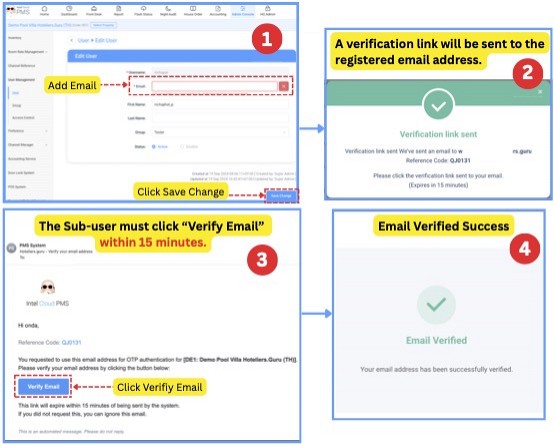
For Sub-users who do not have an email address registered in the PMS, the Super Admin must add an email address by navigating to:
Admin Console → User Management → User → Edit → Add Email
|
About the Email Address
|
2. Sub-user With an Email Address
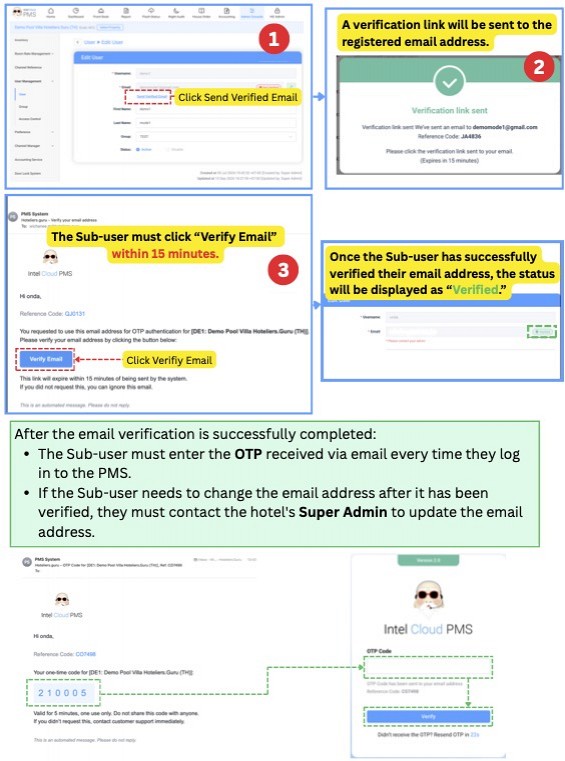
For Sub-users who already have an email address registered in the PMS, the email address must be verified by clicking Send Verification Email.